
ED5 Time Seasons & Weather System (TSW) RPG MAKER MZ PLUGIN
$0.99
Free for Pro subscribers⚡ ED5 Time, Seasons & Weather System
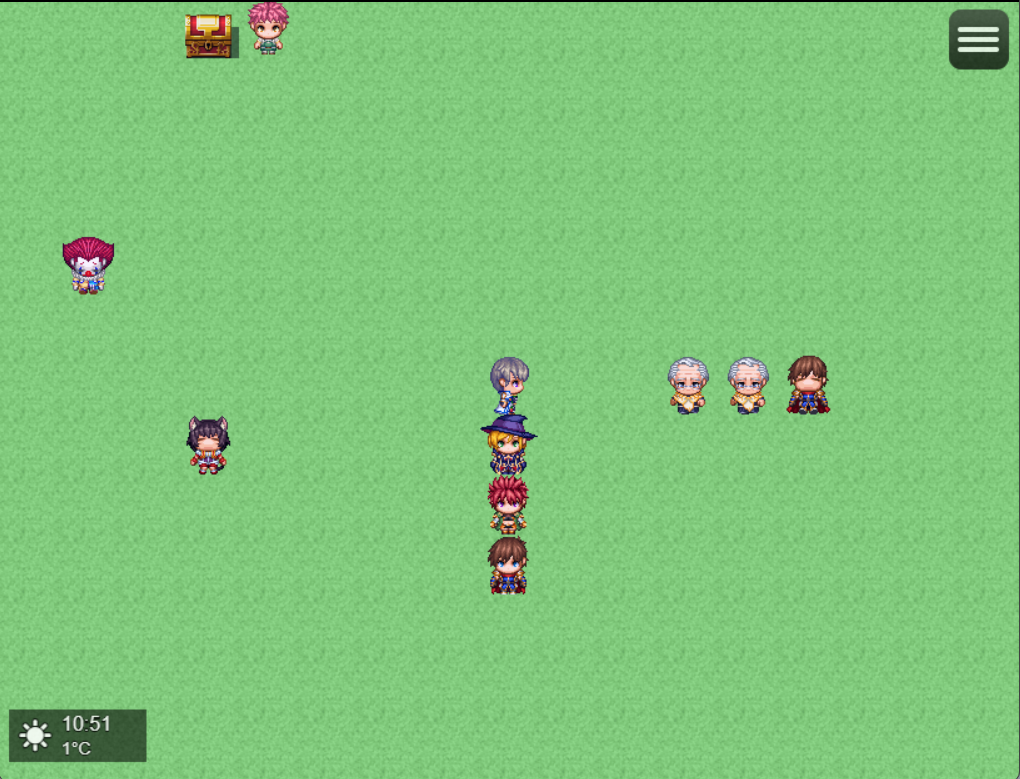
Complete time, weather, seasons & calendar system for RPG Maker MZ & MV
v1.0.1 by ED5 (Chigoox)
🎮 Quick Start Guide
- Copy ED5_TimeSeasonsWeather.js to your project's js/plugins folder
- Enable the plugin in the Plugin Manager
- Configure your preferences in the plugin parameters
- Test by opening the calendar (default: press C key)
⚡ Thunder & Lightning
NEW! Realistic storm effects
- ✓ Screen flashes
- ✓ Thunder sounds
- ✓ Distance-based delays
- ✓ Multiple patterns
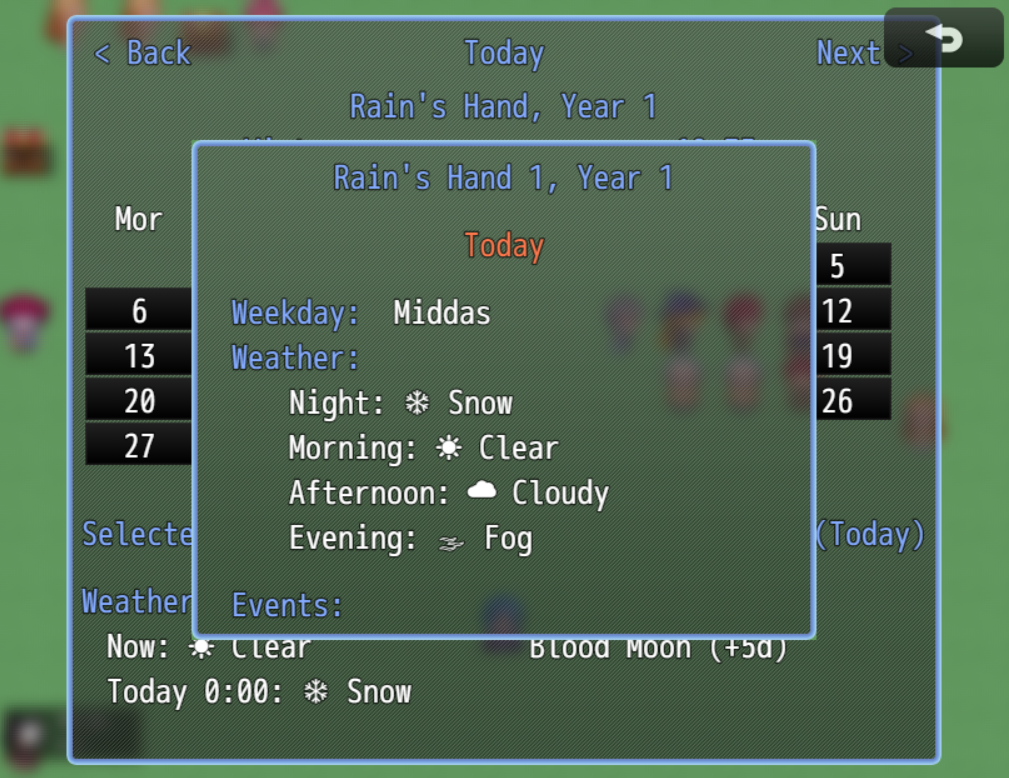
📅 Interactive Calendar
Full-featured calendar system
- ✓ Navigation buttons
- ✓ Holiday support
- ✓ Event scheduling
- ✓ Weather forecast
🌦️ Weather System
7 dynamic weather types
- ✓ Clear, Cloudy, Rain
- ✓ Storm, Snow, Blizzard
- ✓ Fog effects
- ✓ 5-day forecast
🌙 Celestial Events
Astronomical phenomena
- ✓ Blood Moon
- ✓ Harvest Moon
- ✓ Solar Eclipse
- ✓ Custom events
Recent Fixes & Updates
🐛 Bug Fixes
Celestial Events Not Ending - FIXED
- Issue: Blood Moon and other celestial events would never end, especially when advancing time
- Cause: Iterator modification during object traversal causing events to be skipped
- Solution: Implemented two-pass approach - collect expired events first, then end them
- Files Modified:
ED5_TimeSeasonsWeather.js(lines 2259-2273)
Weather Restart on Map Change/Menu - FIXED
- Issue: Rain/snow would restart animation when changing maps or opening menus
- Cause:
applyWeatherEffects()was being called on every Scene_Map.start - Solution: Added checks to prevent reapplying same weather, only apply on actual map changes
- Files Modified:
ED5_TimeSeasonsWeather.js(lines 4355-4363, 3145-3160)
Temperature Not Accumulating with Time Advance - FIXED
- Issue: Temperature conditions only processed real-time, not game time jumps
- Cause: Temperature decay used deltaTime (seconds) instead of game minutes
- Solution: Added game minute tracking and accumulation for temperature/normalize conditions
- Files Modified:
ED5_SurvivalNeeds.js(lines 1192-1229, 1249-1283)
✨ New Features
Variable & Switch Integration - ADDED
- Feature: Complete plugin parameter support for auto-updating variables/switches
- Variables Added:
- Hour, Minute, Day, Month, Year (21-25)
- Season ID, Weather ID, Weather Intensity, Temperature (26-29)
- Switches Added:
- Is Night, Is Dawn, Is Dusk (31-33)
- Is Raining, Is Snowing, Is Storm (34-36)
- Is Shop Hours (37)
- Note: Blood Moon switch removed (use celestial event's built-in switch parameter)
- Files Modified:
ED5_TimeSeasonsWeather.js(lines 1506-1608, 4445-4517)
🔧 Code Quality Improvements
- ES5 Compliance: Ensured all code follows ES5 syntax for MV/MZ compatibility
- Memory Management: Fixed potential memory leaks in event timer system
- Error Handling: Added proper null checks and type validation
- Performance: Optimized weather state checking to reduce redundant operations
📖 Complete Documentation
⌨️ Plugin Commands
Time Management
advanceTime [minutes] - Advance time by minutessetTime [hour] [minute] - Set specific timesetDate [day] [month] [year] - Set specific datepauseTime - Pause time progressionresumeTime - Resume time progressionsetTimeSpeed [speed] - Change time speed (0.5-5.0)Weather Control
setWeather [type] [intensity] [duration] - Change weatherclearWeather - Clear to sunny weatherrefreshWeather - Update weather from forecastTypes: CLEAR, CLOUDY, RAIN, STORM, SNOW, BLIZZARD, FOG
Calendar & UI
openCalendar - Open calendar interfaceshowTime - Show time windowhideTime - Hide time windowtoggleTimeWindow - Toggle time displaySeason Control
setSeason [season] - Force season changetransitionSeason [season] [duration] - Gradual season changeSeasons: SPRING, SUMMER, AUTUMN, WINTER
Holiday Management
addHoliday [name] [day] [month] [recurring] - Add holidayremoveHoliday [name] - Remove holiday by name💻 Script API Reference
Time System API
Weather System API
Season System API
Holiday System API
Event System API
📝 Code Examples
Example 1: Weather-Based Events
Example 2: Time-Based Shop Hours
Example 3: Seasonal Crop Growth
Example 4: Holiday Events
Example 5: Blood Moon Event
Example 6: Temperature System
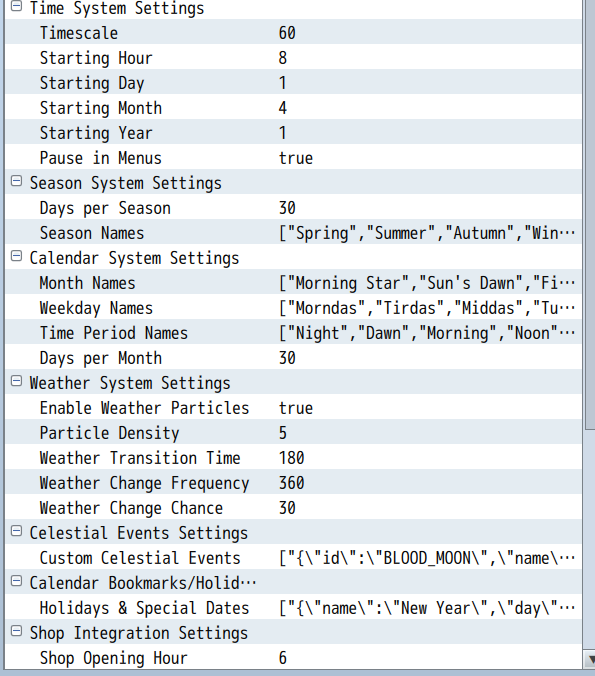
⚙️ Plugin Parameters
| Parameter | Description | Default |
|---|---|---|
startHour |
Starting hour (0-23) | 6 |
startMinute |
Starting minute (0-59) | 0 |
timeSpeed |
Minutes per real second | 1 |
pauseInMenu |
Pause time in menus | true |
pauseInBattle |
Pause time in battle | true |
pauseInEvents |
Pause during events | true |
enableTint |
Enable screen tinting | true |
enableWeatherParticles |
Enable weather effects | true |
enableLightning |
Enable lightning flashes | true |
enableThunder |
Enable thunder sounds | true |
calendarKey |
Key to open calendar | C |
🎮 Calendar Controls
• Arrow Keys - Move between dates
• OK/Enter - View day details
• Cancel/Escape - Close calendar
• Q/PageUp - Previous month
• W/PageDown - Next month
• Shift+OK - Jump to today
• Mouse/Touch - Click dates and buttons
Day Details Window:
• Up/Down - Scroll content
• PageUp/PageDown - Fast scroll
• OK/Cancel - Close details
⚡ Thunder & Lightning System
• Automatic activation during STORM weather
• 3 lightning patterns (single, double, flicker)
• Distance-based thunder delay (1-4 units)
• Variable intensity based on storm strength
• Stereo panning for immersive audio
Customization:
•
enableLightning - Toggle screen flashes•
enableThunder - Toggle thunder sounds•
lightningFrequency - Rate of strikes (1-10)•
thunderVolume - Base volume (0-100)Sound Files Used:
• Thunder7 - Distant rumble
• Thunder8 - Medium distance
• Thunder9 - Close strike
✅ Compatibility
- RPG Maker MZ: Full compatibility (v1.6.0+)
- RPG Maker MV: Full compatibility (v1.6.2+)
- Works with: YEP plugins, VisuStella MZ, most other plugins
- Save files: Fully compatible, no save corruption
- Mobile: Optimized for mobile devices
🛠️ Troubleshooting
Weather not matching forecast:
• Ensure time is advancing (check pause settings)
• Weather updates every 6 hours (0:00, 6:00, 12:00, 18:00)
• Use refreshWeather command to force update
Calendar not opening:
• Check the calendar key setting (default: C)
• Ensure no other plugins use the same key
• Try using the plugin command openCalendar
Performance issues:
• Reduce particle count in parameters
• Disable weather particles if needed
• Lower lightning frequency for storms
Holidays not showing:
• Check date format (day 1-30, month 1-12)
• Ensure holiday name is unique
• Verify recurring flag for annual events
🚀 Performance Tips
- Particle Optimization: Set max particles to 50-100 for mobile
- Tint Performance: Disable tinting if FPS drops below 30
- Event Reduction: Limit celestial events to 1-2 active
- Forecast Range: Keep forecast days at 5 or less
- Update Frequency: Increase time speed to reduce calculations
💬 Support & Contact
Need help or found a bug?
📧 Email: Contact through itch.io
🎮 Discord: Join our community server
📝 Forums: RPG Maker Web Forums
Visit itch.io Support on Patreon
📜 Terms of Use
- ✅ Free for commercial and non-commercial use
- ✅ Can be used in multiple projects
- ✅ Can modify for your needs
- ⚠️ Do not redistribute or resell the plugin itself
- ⚠️ Credit "ED5 (Chigoox)" in your game
- 💝 Consider supporting on Patreon for updates!
🎯 Future Updates (Patreon Supporters)
All my plugins for $3 a month!
- Get early access and vote on features: Join Patreon
Purchase
$0.99

Reviews
Comments
Sign in to comment