plugin
ED5 Visual Equipment Plugin
$4.99
Visual Equipment Plugin for RPG Maker MZ
Overview
Enhance your RPG Maker MZ projects with the Visual Equipment Plugin! This plugin allows you to visually equip sprites on top of the player character, adding a new layer of immersion and customization to your game.
Features
- Dynamic Equipment Sprites: Display equipment visuals directly on your player characters based on the items they equip.
- Layer Control: Use note tags to specify the layering order of equipment sprites, allowing for complex visual setups.
- Conditional Visibility: Show or hide equipment sprites based on game switches or variables, offering dynamic visual customization options.
Note Tags
<show:name_of_file>: Specifies the image file to use for the equipment.<layer:layerorder>: Sets the layer order. Negative numbers place the sprite below the player, while positive numbers place it on top. Default is 1. (set to 0!!)<show:name_of_file_sX_true>: Shows the sprite if switch X is ON.<show:name_of_file_sX_false>: Shows the sprite if switch X is OFF.<show:name_of_file_vX_Y>: Shows the sprite if variable X equals Y.
Setup
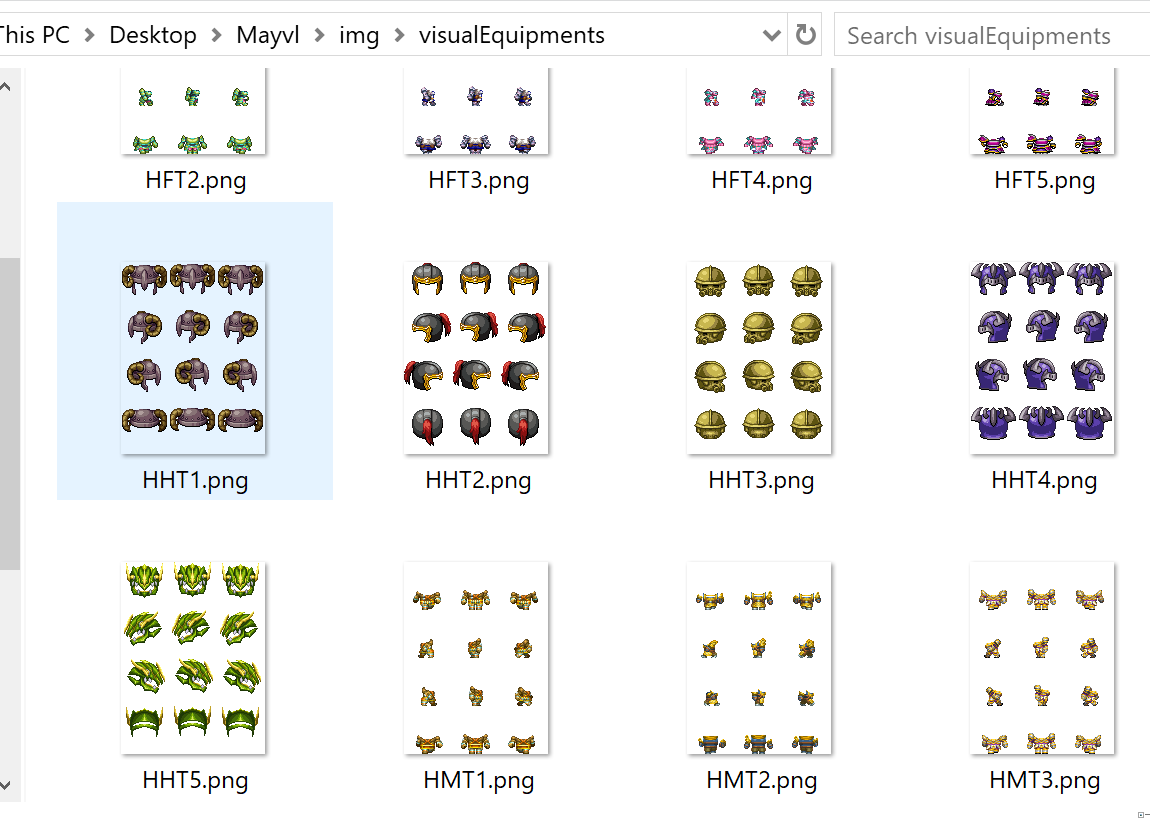
- Place your equipment images in the
img/visualEquipmentsfolder. - Add the appropriate note tags to your equipment items to control their visuals.
How the visual equipment folder and sprites should look:
Usage
Easily customize your characters' appearance based on their equipped items. Whether it's a shining sword, a mystical staff, or a protective helmet, your players will see their equipment in real-time!
Bring your RPG Maker MZ characters to life with the Visual Equipment Plugin. Download now and transform the way your players experience equipment in your game!
Purchase
$4.99
Reviews
Comments
Sign in to comment