ED5 Skill Creator v2.0 - RPG Maker MZ Plugin
$0.99
Free for Pro subscribersED5 Skill Creator v2.0 - RPG Maker MZ Plugin
Let players create custom skills in-game with an intuitive workshop interface!
Transform your RPG into a dynamic experience where players design their own unique skills. Perfect for magic academy games, sandbox RPGs, and any game where customization matters.
✨ Key Features
🎨 Visual Skill Workshop
- Intuitive in-game skill creation interface
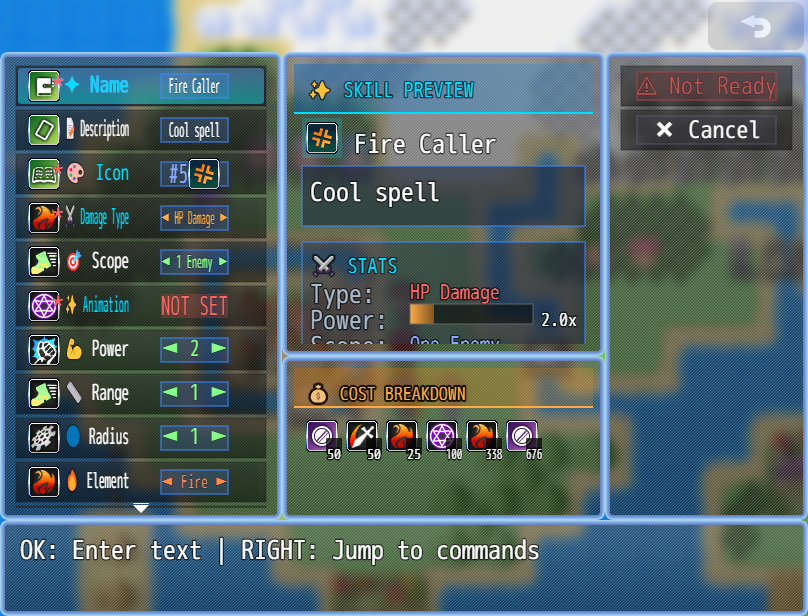
- Live preview window shows skill in real-time
- Cost breakdown with detailed calculation display
- Step-by-step property selection
🧙 Smart Procedural Generation
- Element-based naming: Fire, Ice, Thunder, Water, Earth, Wind, Holy, Dark
- Scope-aware suffixes: Bolt (single), Storm (AOE), Heal (support)
- Power tiers: Minor, Normal, Greater, Superior, Ultimate
- Icon pools per element and scope: Thematic icons automatically selected
- Duplicate name prevention with smart fallbacks
💰 Dynamic Cost System
- MP cost calculated from skill power and effects
- Gold cost for skill creation (MP × multiplier)
- Visual cost breakdown window
- Factors: Base cost, Power, Range, Radius, Effects, Elements
🎯 Full Validation
- Ensures skills have valid names
- Checks power levels and ranges
- Validates effects and animations
- Prevents broken or invalid skills
📚 Skill Management
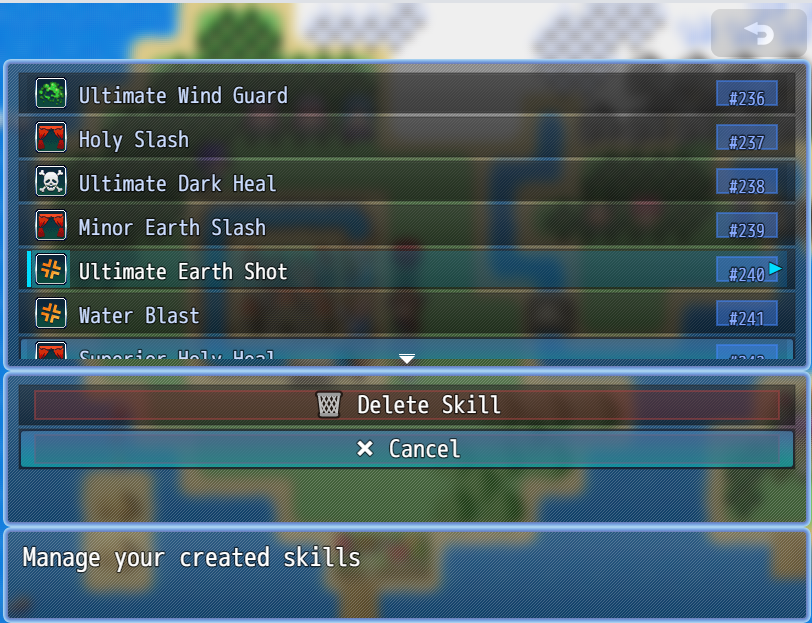
- View all created skills in-game
- Delete unwanted skills
- Persistent save/load system
- Track skill history
🔗 Integration Features
- Alpha ABS support: Range and radius properties for action battles
- Skill Shop integration: Created skills auto-appear in shops
- Skill book generation: Automatically creates tradeable books
- Configurable party member auto-learning
🚀 How to Use
Basic Setup
- Configure Parameters
- Set available icons for skill creation
- Choose animations players can use
- Define status effects available
- Configure cost multipliers
- Set Name Generation
- Configure element prefixes (Fire, Ice, etc.)
- Define icon pools for each element and scope type
- Set suffix options (Bolt, Storm, Heal, etc.)
- Choose power tier names
- Open Workshop
Plugin Command: Open Skill Creator
Player Experience
- Player opens workshop from event or menu
- Selects skill properties (name, icon, power, scope, etc.)
- Preview updates in real-time
- Cost breakdown shows MP and Gold requirements
- Creates skill when ready (pays gold cost)
- Skill is learned by party leader automatically
📋 Plugin Commands
MZ Commands
- Open Skill Creator - Opens the skill creation workshop
- Open Skill Manager - Opens the skill management interface
- Generate Random Skill - Procedurally generates a random skill
- Delete Created Skill - Delete a specific created skill by ID
🛠️ Script Calls
// Open workshop
ED5.SkillCreator.openWorkshop()
// Open skill manager
ED5.SkillCreator.openManager()
// Generate random skill
ED5.SkillCreator.generateRandomSkill()
// Get all created skill IDs
ED5.SkillCreator.getCreatedSkills()
// Create skill programmatically
ED5.SkillCreator.createSkill(skillData)
// Delete a skill
ED5.SkillCreator.deleteSkill(skillId)
🎨 Procedural Generation System
How It Works
The plugin generates skill names and icons intelligently:
- Element Selection: Randomly picks from Fire, Ice, Thunder, Water, Earth, Wind, Holy, Dark
- Scope Determination: Single-target, AOE, or Support
- Suffix Selection: Matches scope type (Bolt for single, Storm for AOE, Heal for support)
- Power Tier: Based on power level (1-5): Minor, Normal, Greater, Superior, Ultimate
- Icon Selection: Chooses from element's scope-appropriate icon pool
Example Names Generated
- Fire Bolt - Single target fire skill (uses Fire single-target icons)
- Greater Ice Storm - AOE ice skill (uses Ice AOE icons)
- Superior Holy Heal - Strong healing skill (uses Holy support icons)
- Ultimate Dark Wave - Maximum power dark AOE (uses Dark AOE icons)
Icon Pool System
Each element has 3 icon pools that ensure thematic consistency:
Fire Element:
  singleIcons: [64,65,66]  - Icons for Fire Bolt, Fire Shot, Fire Strike
  aoeIcons: [67,68,69]     - Icons for Fire Storm, Fire Blast, Fire Wave
  supportIcons: [70,71,72] - Icons for Fire Heal, Fire Guard
Benefits:
- No more random sword icons on healing spells
- Fire spells always look like fire
- AOE spells get visually distinct icons
- Full control over visual theme
💡 Example Use Cases
Example 1: Magic Academy Game
Players attend classes and create spells in the workshop
Each class unlocks new elements and effects
Progressive skill creation as students advance
Example 2: Dungeon Crawler with Skill Rewards
Defeat bosses to unlock skill creation materials
Generate random skills as dungeon loot
Players customize builds with unique skill combinations
Example 3: Sandbox RPG
Players experiment with different skill combinations
Workshop available in towns
Created skills can be sold in shops to other NPCs
📦 Parameters
Icon Configuration
- Available Icons: Icons players can choose from
- Configure as structured data with index and description
Animation Configuration
- Available Animations: Animations for skill effects
- Configure with ID and preview description
Effect Configuration
- Available Effects: Status effects for skills
- Set state ID and application chance
Cost Settings
- Base Cost: Starting MP cost (default: 50)
- Cost Per Power: MP increase per power level (default: 50)
- Cost Per Range: MP cost for ABS range (default: 20)
- Cost Per Radius: MP cost for ABS radius (default: 25)
- Cost Per Effect: MP cost per status effect (default: 100)
- Element Cost: Additional cost for elemental skills (default: 25)
- Gold Cost Multiplier: Gold = MP × this value (default: 2.0)
Name Generation
- Name Prefixes: Element names with icon pools
- Prefix name (Fire, Ice, etc.)
- Element ID
- Single target icon pool
- AOE icon pool
- Support icon pool
- Name Suffixes: Skill type names (Bolt, Storm, Heal, etc.)
- Name Tiers: Power level modifiers (Minor, Greater, Ultimate, etc.)
- Prevent Duplicate Names: Ensure unique skill names
Integration Settings
- Enable ABS Integration: Add range and radius properties
- Give Book on Creation: Create skill book item when skill is made
- Add to Shops on Creation: Make skill available in shops automatically
- Skill Book Icon Offset: Icon offset for book items
Limits
- Max Created Skills: Maximum skills players can create (default: 100, -1 = unlimited)
🎮 Workshop Interface
Main Windows
- Command Window
- Create - Make the current skill
- Random - Generate random skill properties
- Manage - View/delete created skills
- Exit - Close workshop
- Property Window
- Name - Set skill name
- Icon - Choose from available icons
- Animation - Select visual effect
- Power - Set damage/healing strength (1-5)
- Scope - Choose target type
- Element - Pick elemental affinity
- Effects - Add status effects
- Range - Set ABS range (if enabled)
- Radius - Set ABS radius (if enabled)
- Preview Window
- Shows skill icon and name
- Displays all properties
- Updates in real-time
- Cost Window
- MP Cost breakdown
- Gold Cost calculation
- Shows each cost component with icon
🔧 Technical Details
Skill Data Structure
Created skills include:
- id: Unique skill ID (2001+)
- name: Skill name
- iconIndex: Icon index
- description: Auto-generated description
- animationId: Visual effect
- scope: Target type
- damage: Formula and type
- _power: Power level (1-5)
- _range: ABS range
- _radius: ABS radius
- _effects: Status effect array
- mpCost: Calculated MP cost
- tpCost: TP cost (if any)
Save Data
All data persists across save/load:
- Created skill IDs
- Used skill names
- Full skill data in $dataSkills
- Skill configurations
Compatibility
- RPG Maker MZ 1.8.1+
- ES6+ JavaScript syntax
- Modern class-based architecture
- Comprehensive error handling
- Performance optimized
📝 Version Info
Version: 2.0
Compatibility: RPG Maker MZ
Dependencies: None (fully standalone)
Optional Integration: ED5_Skill_Shops, Alpha ABS
🆓 License
- ✅ Free for commercial and non-commercial use
- ✅ Credit ED5/ChigooX appreciated but not required
- ✅ Modify as needed for your project
- ❌ Do not redistribute as your own
🌟 What Players Will Experience
Creating a Skill
- Enter the workshop
- Choose a name or let it generate randomly
- Pick an icon that looks cool
- Set power level (stronger = more expensive)
- Choose single target or AOE
- Select element (Fire, Ice, etc.)
- Add status effects (optional)
- Preview shows exactly how it will look
- Check cost - do they have enough gold?
- Create! Skill is learned instantly
Using Random Generation
- Hit "Random" button
- Skill generates with balanced properties
- Smart naming based on element and scope
- Thematically appropriate icon selected
- Adjust if desired or accept as-is
- Create with one button press
🎯 Quick Start
5 Minute Setup:
1. Add plugin to RPG Maker MZ project
2. Configure Name Prefixes with element icon pools:
   Fire: singleIcons[64,65,66], aoeIcons[67,68,69], supportIcons[70,71,72]
   Ice: singleIcons[73,74,75], aoeIcons[76,77,78], supportIcons[79,80,81]
   (Repeat for all elements)
3. Set available animations (1,2,3,4,5, etc.)
4. Set cost multipliers if desired
5. Use Plugin Command: Open Skill Creator
6. Done! Players can create skills!
💬 Support & Community
Need help? Found a bug? Want to share your implementation?
Contact ED5/ChigooX or visit the plugin page
Empower your players with the ultimate skill creation system!
Compatible with RPG Maker MZ 1.8.1+ | Version 2.0 | By ED5/ChigooX
Purchase
$0.99
Reviews
Comments
Sign in to comment